


SEO Metadata Best Practices
Every system that reads your site starts with metadata.
Metadata is still one of the highest-leverage, lowest-cost SEO improvements you can make.
Search engine result pages have gotten more competitive, more crowded, and more AI-influenced since most metadata guides were written. The fundamentals haven't changed, title tags and meta descriptions still matter. More platforms than ever are looking at your meta data now, not just search engines or social media - AI assistants, answer engines, and AI-curated feeds all pull from the same metadata your site has been publishing for years. If that metadata is vague, stale, or incomplete, every system that reads your pages is working with bad information.
This guide covers what metadata is, how to write it well in 2026, and where it fits in a broader SEO and AEO strategy.
What is Metadata?
Metadata is data about data. It lives inside the <head> of a webpage -- invisible to visitors but fully readable by search engines, social platforms, AI crawlers, and browser applications. When your page appears in a Google search, the title and descriptive text you see are pulled from metadata. When someone shares your page on Facebook or LinkedIn, the thumbnail, headline, and summary come from metadata. When an AI assistant is asked about a topic your site covers, metadata is part of what it reads to understand whether your page is relevant.
Getting metadata right isn't a one-time task. Pages change, priorities shift, and the systems reading your metadata have grown more sophisticated. Metadata that was adequate five years ago may be actively working against you now.
SEO metadata is what appears on search engine result pages (SERP) when a website comes up for certain queries. It includes the title of the page and its meta description (descriptive text below the title). Read on for a useful metadata best practices guide.
Meta Title
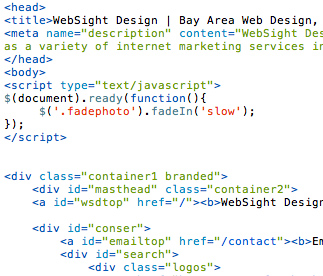
The meta title is the clickable headline that appears in search results and in the browser tab. It's should tell both search engines and users what a page covers.
Try Keep it under 60 characters. Google truncates titles that run longer, anything cut off in the SERP costs you context and looks unprofessional. Spaces count toward the limit.
Lead with the topic, end with the brand. Put the most descriptive content first, where it carries the most weight. The site or company name belongs at the end, separated by a hyphen.
Example: SEO Metadata Best Practices - WebSight Design
Include your primary keyword, but only if it's in the page body. Title tags are description of the page, not a place to stuff terms your page doesn't actually cover. Google cross-references the title against the page content. Mismatches are penalized, or if Google feels your title does not properly describe the page, it gets rewritten entirely. One important note for 2026: Google rewrites title tags more aggressively than it used to, particularly when it judges the original title to be too short, too keyword-heavy, or misaligned with the page's actual content. The best defense is writing a title that's accurate, specific, and serves the user, Google is far less likely to override a title that genuinely reflects the page
Write it for the click, not just the crawl. A title that ranks but doesn't get clicked is only doing half its job. Ask yourself, does this the title accurately represent this page and give someone a reason to choose it over the result above and below it?
Meta Description
The meta description is the block of text that appears beneath the title in search results. It doesn't directly influence rankings, but it directly influences click-through rate -- which does influence rankings over time.
Keep it under 160 characters. Google will truncate anything longer, often at an awkward point. Aim for 140-155 to give yourself a reliable buffer across devices.
Describe the page accurately. Google reserves the right to replace your meta description with text pulled directly from the page body if it determines your description is non-descriptive, misleading, or irrelevant to the query. The best way to keep your description is to make it genuinely useful.
Include at least one keyword from the title. Not for stuffing purposes, because it signals topical consistency and Google bolds matching terms in the description when they match the user's query, which draws attention.
Write it like a pitch, not a label. A meta description is marketing copy. It should tell someone what they'll find on the page and give them a reason to click, in plain language.
Example: A practical guide to writing meta titles, meta descriptions, and structured data that works across search engines, social platforms, and AI-powered answer surfaces.
One consideration that didn't exist a few years ago: AI assistants and answer engines read meta descriptions as a concise summary of what a page contains. A vague or generic description is a missed opportunity to shape how AI systems characterize your content when they surface it to users.
The Keyword Field
Many CMS platforms, including WSD's custom CMS, include a dedicated metadata keywords field. This field was once a primary SEO input; Google stopped using it as a ranking signal years ago and Bing largely ignores it. It has no meaningful impact on search rankings in 2026.
That said, it isn't entirely useless. Some internal site search systems, third-party analytics tools, and content management workflows still reference the keywords field for categorization and filtering. If your CMS includes it, it's worth maintaining for internal organization purposes.
If you're allocating time and attention to metadata, spend it on titles and descriptions, keywords can be a secondary meta information about that page, just don't expect it to move rankings.
Implementation
How metadata gets implemented depends on how your site is built.
For CMS-based sites, the right approach is dedicated metadata fields built into every page template, separate inputs for the title, description, and social metadata, so whoever manages the site can customize each page without touching code.
For WordPress sites, Yoast SEO and All-In-One-SEO are the standard solutions. Both handle title tags, meta descriptions, and social metadata from a single interface with per-page controls.
For large sites with hundreds or thousands of pages, a template-driven approach that auto-generates metadata from existing content (page titles, category names, product data) is often the practical starting point, with manual customization applied to high-priority pages.
The most common metadata problems WSD encounters on audit: titles that were never customized and default to the CMS page name, descriptions that are identical across multiple pages, and social metadata that was never configured at all. None of these are difficult to fix, but all of them are costing sites performance they've already earned.
WebSight Design writes and implements metadata that works across search, social, and AI-powered surfaces. Contact us today to see what your site's metadata is actually doing.
FAQs
What is metadata in SEO? Metadata is code in the <head> of a webpage that describes the page to search engines, social platforms, and AI systems. The two elements that matter most for SEO are the meta title (the clickable headline in search results) and the meta description (the summary text below it).
Does Google still rewrite meta titles? Yes and more frequently than it used to. Google rewrites titles it judges to be too short, too keyword-heavy, repetitive, or misaligned with page content. Writing accurate, specific titles that genuinely reflect the page is the most reliable way to keep your titles intact.
Does the meta description affect rankings? Not directly. Meta descriptions are not a confirmed ranking factor. However, a well-written description improves click-through rate, and sustained click-through performance does influence rankings over time. It also shapes how AI systems summarize your content.
How long should a meta title be? Under 60 characters including spaces. Titles that exceed this are truncated in search results. Aim for 50-58 characters to give yourself a reliable buffer.
How long should a meta description be? Under 160 characters including spaces. Aim for 140-155 to avoid truncation on mobile, where the display limit is often shorter.
Do metadata keywords still matter for SEO? No. Google stopped using the metadata keywords field as a ranking signal years ago. Bing and other major engines also ignore it. Maintain it for internal organizational purposes if your CMS includes it, but don't expect it to affect search performance.
Does metadata matter for AI search? Yes, significantly. AI assistants and answer engines read metadata as a primary signal for what a page covers and whether it's relevant to a query. Vague or generic metadata gives AI systems less to work with and reduces the likelihood your content gets accurately surfaced.
What's the difference between SEO metadata and social metadata? SEO metadata (title tags and meta descriptions) controls how pages appear in traditional search results. Social metadata -- implemented through Open Graph tags and X Cards -- controls how pages appear when shared on social platforms and messaging apps. They work in parallel and should both be configured.
How do I know if my metadata needs work? A site audit is the clearest way to find out. Common issues include uncustomized titles that default to page or CMS names, duplicate descriptions across multiple pages, descriptions that exceed character limits, and social metadata that was never set up. WSD offers metadata audits as part of broader SEO engagements.